


Page 94 - ICE BUSINESS TIMES December 2019
P. 94
Tech
By Abhijit Asad display – to say nothing about as a numeric keypad for the
enjoying 4K movies in glorious
coming alive in illuminated
HDR colours. The ScreenPad keyboard, with the numbers
Plus works seamlessly with form in a very science
the primary display, and it can fiction-like fashion. The
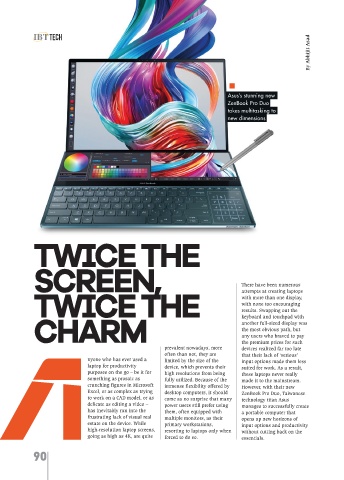
Asus’s stunning new be used both as a dedicated Harman Kardon speakers are
ZenBook Pro Duo display or as a vertical outstanding, even more so
takes multitasking to extension of the primary one. when considering their
new dimensions It must be mentioned here that minuscule size. The 71Whr
both the displays support battery, while formidable, is
touch input, but it is the one of the less exciting aspects
ScreenPad Plus on which this of the device, offering rather
feature shines the most. Asus average battery life – however,
has worked closely with given the ridiculous number of
Microsoft to create a user pixels which the device has to
experience that is truly push every second, it’s quite a
unique. The ScreenPad Plus’s wonder that it holds out as
custom software allows for the well as it does.
quick pinning and tiling of While the screens of the
groups of up to three preset ZenBook Pro Duo end up
program windows to it as per stealing most of the spotlight,
front of the keyboard to place the user’s preferences, and the rest of it is nothing to
a secondary display – called even allows for quick sneeze at. Its beautiful
the ScreenPad Plus – of the switching of tiled app groups space-age design pulses with
same width as that of the between the primary and the combined might of an
laptop’s main display, but secondary displays at the almost obscenely powerful
having approximately half the touch of a key when the app 9th-generation Intel Core i9
height. While the usefulness of windows on the ScreenPad eight-core processor, a
TWICE THE dubious, the difference it Even mundanely prosaic tasks, blisteringly fast 1TB PCIe SSD
staggering 32GB of RAM, a
Plus require greater attention.
such a screen may seem
and a powerful
such as moving between word
makes in terms of productivity
ray-tracing-capable GeForce
processor, spreadsheet and
is nothing short of astounding,
SCREEN, There have been numerous even more so because it did presentation windows when RTX 2060 GPU, this laptop is
ready to handle pretty much
compiling reports, become
not come at the expense of the
any challenge thrown at it, be
immensely enjoyable activities
keyboard or the touchpad.
it heavy-duty video editing or
by eliminating the need to
For starters, the ZenBook Pro
attempts at creating laptops
TWICE THE with more than one display, Duo’s 15.6” main display is switch between the programs even be used as a dedicated running the latest AAA game
titles. It is also one of the first
constantly.
already stunning. Framed by
with none too encouraging
laptops to come with Wi-Fi 6,
Asus has successfully walked
thin bezels, not only does it
results. Swapping out the
the latest generation of the
the fine line between ease of
panel of buttons that can play
have a staggering resolution of
keyboard and touchpad with
CHARM another full-sized display was 4K, but it is also one of the use and customizability when back recorded keyboard connectivity standard. It even
supports Thunderbolt 3 out of
designing the ScreenPad Plus
few rare laptop displays to
commands for individual
the most obvious path, but
the box for providing 4K video
and its associated software,
programs.
utilize OLED technology,
any users who braved to pay
output to external monitors or
that has gone into it is clearly
more suitable for creative
prevalent nowadays, more the premium prices for such something mostly seen only on and the amount of research What makes this device even for connecting high-end
certain mobile phones,
devices realized far too late
often than not, they are that their lack of ‘serious’ While the idea of a second typically higher-end ones. For evident from the results. The purposes is both its displays peripherals that require the
nyone who has ever used a limited by the size of the input options made them less screen on a laptop may not non-techie users, this means ScreenPad plus can be used in natively support highest data transfer rates.
laptop for productivity device, which prevents their suited for work. As a result, seem particularly original, that this display is capable of a variety of ways for different pressure-sensitive stylus input All in all, it is safe to say that
purposes on the go – be it for high resolutions from being these laptops never really Asus’s implementation of it displaying the most vibrant programs. For example, it can using the bundled Asus Pen. while the ZenBook Pro Duo’s
something as prosaic as fully utilized. Because of the made it to the mainstream. certainly is. Instead of going colours and the purest of be used to display the virtual Keeping user ergonomics in design may not become
crunching figures in Microsoft immense flexibility offered by However, with their new with a gimmicky and nearly blacks, while managing to mixing console of an audio mind, Asus has thoughtfully mainstream anytime soon, it
Excel, or as complex as trying desktop computers, it should ZenBook Pro Duo, Taiwanese useless mini-screen like the showcase an astonishing engineer while the main taken care to include a offers an exciting glimpse into
to work on a CAD model, or as come as no surprise that many technology titan Asus Touch Bar of post-2016 range of contrast in the display shows the audio separate palmrest for the the future of laptop design as
delicate as editing a video – power users still prefer using manages to successfully create MacBook Pros, or replacing the process. Any professional, tracks, allowing the user to ZenBook Pro Duo, since the well as that of productivity on
has inevitably run into the them, often equipped with a portable computer that entire lower deck of the laptop particularly ones working in manipulate the knobs and laptop lacks a built-in one, the go, proving once again
frustrating lack of visual real multiple monitors, as their opens up new horizons of with a full-sized screen, Asus the fields of graphic design, sliders directly by touch, or it making the keyboard much that breakthroughs can often
estate on the device. While primary workstations, input options and productivity wisely moved the touchpad to motion graphics or video can be used to display colour more comfortable for natural emerge in the most unexpected
high-resolution laptop screens, resorting to laptops only when without cutting back on the the right of the keyboard, and editing, would be blown away panels and tool panels while use. It is interesting to note of forms in the world of
going as high as 4K, are quite forced to do so. essentials. used the freed-up space in by the sheer fidelity of this running Photoshop. It can that the touchpad also doubles technology.
90

